

Python How To Create A Csv File
In this topic, we are going to learn how to read and write CSV files in python.
Definition : CSV (comma separated value) is similar to a text file where data stored are separated by some delimiter (usually a comma). Each field is separated by a delimiter. In Python, CSV files are processed using the CSV module. So, we have to import this module.
Ex : import csv
The below example shows the way the data is stored in a CSV file. Here, a comma is used as a delimiter.
Filename : person_info.csv
first name,middle name,last name,age
Anand,kumar,math,31
Sachin,ramesh,tendulakar,40
Virendra,sehwag,singh,38
Rahul,dravid,xyz,40
CSV file can be opened in any of the following modes:
r –> read mode
w –> write mode
a –> append mode
In Python, a file operation is performed in the following order:
- Open a file;
- Read, write, or append. When we specify write mode, the file will be opened in write mode if the file exists, otherwise, it is going to create a file. This is also applicable for append mode. In read mode, if a file exists, it will open the file in read mode, otherwise, it throws FileNotFoundError exception; and
- Close the file.
Open a csv file
Inbuilt method open() is used.
Ex:
- f = open("filename.csv","r") # In csv python default is read mode
- f = open("filename.csv",'w') # write mode
Closing a file
Inbuilt method close() is used.
fp = open ( "filename.csv" ,'w')
# perform some file operations
fp.close ( )
File operations using with
The best way to perform CSV file operation, and the most commonly used method, is with the statement. Using this ensures that the file is closed when the block inside with is exited.
Ex:
with open ('filename.csv', 'w', encoding = 'utf-8' ) as fp:
#perform some file operations
#statements outside the with block
When we exit with block, the file will be closed automatically.
Write to a CSV file
To write into a CSV file, we need to open it in write 'w' or append 'a' mode.
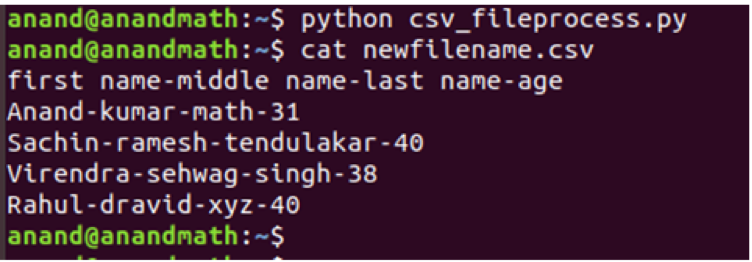
In the below example, we are going to read from one file and write to a new file.
import csv
with open ( 'filename.csv' , 'r' ) as fp:
reader = csv.reader (fp) #read file
with open ( 'newfilename.csv' , 'w' ) as fq:
writer = csv.writer (fq, delimiter = '-' )
for line in reader:#To iterrate over each row
writer.writerow (line) #write line to new file
Using dictionary writer
In the below example, we are going to read from one file and write to a new file using the DictWriter() method.
import csv
with open ( 'filename.csv' , 'r' ) as fp:
reader = csv.DictReader (fp) #read file
with open ( 'newfilename.csv' , 'w' ,newline= '' ) as fq:#newline = '' to avoid adding extra new line
row_names = [ 'first name' , 'middle name' , 'last name' , 'age' ]
writer = csv.DictWriter (fq, fieldnames = row_names, delimiter = '-' )
writer.writeheader ( ) #write heading lines
for line in reader:
writer.writerow (line)

Writerows()
This method writes multiple rows at a time; we need to pass a list of lists. Ex:
import csv
head_names = [ 'first name' , 'middle name' , 'last name' , 'age' ]
# data rows of csv file
rows = [ [ 'Anand' , 'kumar' , 'math' , 31 ] ,
[ 'Sachin' , 'ramesh' , 'tendulakar' , 40 ] ,
[ 'Virendra' , 'sehwag' , 'singh' , 38 ] ,
[ 'Rahul' , 'dravid' , 'xyz' , 40 ] ]
# writing to csv file
with open ( 'newfilename.csv' , 'w' ) as fp:
# creating a csv writer object
csvwriter = csv.writer (fp)
# write the heading
csvwriter.writerow (head_names)
# write the data rows
csvwriter.writerows (rows)

Reading from file
To read the CSV file in Python, we must open the file in reading mode 'r'. Ex:
import csv
with open ( 'filename.csv' , 'r' ) as fp:
data = csv.reader (fp)
#default delimiter is comma, if csv separated by other delimiter need to specify
#Ex data = csv.reader(fp, delimiter = '-')
print (data) # it return object
#skipping the header
next(data) #call next method of generator
for line in data:#To iterrate over each row
print (line) # print each value in a list
fp.seek ( 0 ) # bring cursor to first line
for line in data:
print (line[ 0 ] ) # print only first names

Using dictionary reader
To read csv file using DictReader() method.
import csv
with open ( 'filename.csv' , 'r' ) as fp:
reader = csv.DictReader (fp) #read file
for line in reader:
print (line) #print each row in the form of dictinary
fp.seek ( 0 ) # bring cursor to first line
for data in reader:
print (data[ 'age' ] ) #we can print only age by using 'age' key

Conclusion
We have learned how to read and write a file using the CSV module. CSV file is the most commonly used file format in the automation industry because it is easy to read and modify the data. Also, Pandas is another method we can use to process CSV files.
About the author

Bamdeb Ghosh is having hands-on experience in Wireless networking domain.He's an expert in Wireshark capture analysis on Wireless or Wired Networking along with knowledge of Android, Bluetooth, Linux commands and python. Follow his site: wifisharks.com
Python How To Create A Csv File
Source: https://linuxhint.com/csv-file-handling-in-python/
Posted by: werneralwyet.blogspot.com
0 Response to "Python How To Create A Csv File"
Post a Comment